
Discover how Softaken OST to PST Converter helps convert inaccessible OST files to PST safely. Full review, features, and pricing explained.
The frustration of dealing with an inaccessible OST file is well-known to anyone who has dealt with email management, whether they are a busy IT administrator or a regular Outlook user. OST files are used to create a local copy of Exchange mailbox data, allowing users to access it when they are offline from the Exchange server. Unfortunately, these files can get corrupted and orphaned if Outlook loses connectivity to the Exchange server.
Having faced the difficulties of an inaccessible OST file, I recently embarked on a search to find the most reliable OST to PST converter software on the market. The Softaken OST to PST Converter was the solution to my search. In this review, I’ll cover the features, real-world user experience, and what makes Softaken stand out in a competitive field.
Before going immediately into the advantages and usage of the Software, let’s first understand what the OST to PST Converter is.
What is Softaken OST to PST Converter Software?
Softaken OST to PST Converter is a specialist tool for converting inaccessible, orphaned or unavailable OST files to PST (Personal Storage Table) files, which can be easily used in Outlook. The core of the software’s essential goal is clear: Secure data extraction from inaccessible OST files. But the software does much more than simple file conversion, which makes it beneficial to both individuals and companies.
Key Features of Softaken OST to PST Converter:
Softaken offers numerous features.
- Complete OST to PST Conversion: All mailbox items, such as emails, attachments, contacts, calendars, journals and notes are converted without affecting the original formatting.
- Selective & Batch Conversion: Users can convert specific folders, emails or even items, making it easy to extract specified data.
- Preview Functionality: Users can preview the mailbox items within the software before going for the full conversion. This function enables you to evaluate the converted data.
- Encrypted OST Support: Support for Password-Protected or Encrypted OST Files.
- Deep Recovery method: If the normal method fails, then it provides a deep scan mode to recover data from severely damaged OST files.
- Export Flexibility: Along with exporting the extracted data to PST, you can save it to other popular formats such as MSG, EML, MBOX, HTML, TGZ, NSF and PDF.
- Compatibility: Compatible with both current and legacy versions of Outlook and Exchange to ensure use in all environments.
- Change Language Options: It offers 20+ Language Options (Chinese, Japanese, Polish, Turkish, etc) so every user can use this software without a language barrier.
User Experience and Usability
Softaken OST to PST Converter setup is quite easy. The installation process is fast, and the interface is user-friendly for individuals with less technical skills. When opening, you will see a clean dashboard with a guide to select your OST file.
Softaken is fast, and scanning starts. Scanning and previewing are quick, even when it comes to huge files. Preview pane is very useful and simple to use, one can easily browse the original mail folder structure, emails and can search calendar items or contacts before exporting data.
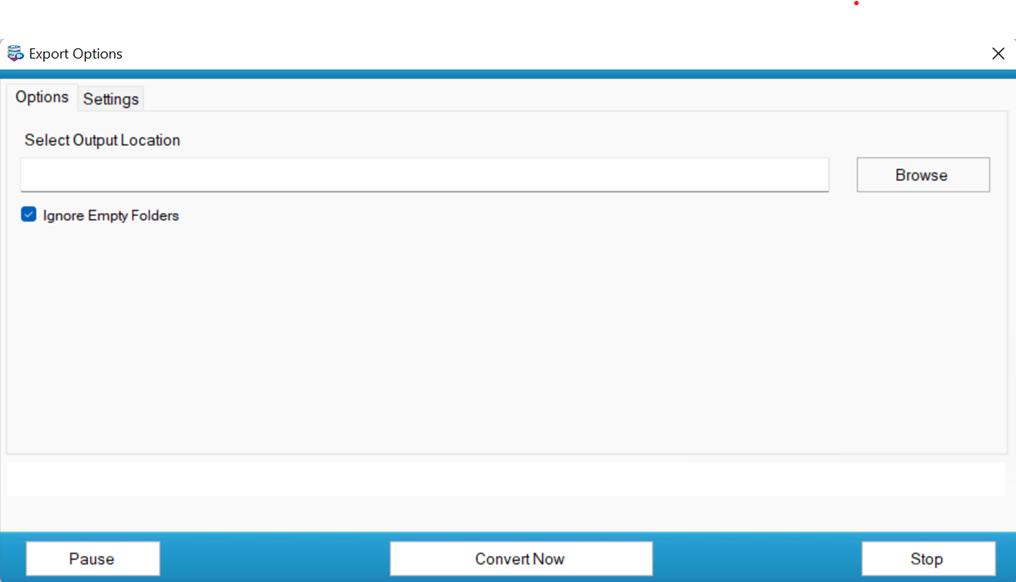
The conversion process itself is straightforward. Pick the folders or items to convert, select your desired output formats and go.
Five Steps to Convert an OST file to PST
- Download and install the Software from the official Softaken Website.
- Browse and upload the OST files that you want to convert.
- After uploading, take a quick preview of the uploaded OST Mailbox items.
- Select the desired file type from the file list (PST, EML, MSG, MBOX, TGZ, etc).
- Now, choose the desired path for storing the resulting data and click on the convert button.
Real-World Performance
When I tested Softaken OST to PST Converter in real situations, here’s what I discovered:
Speed of Conversion
Small OST files are converted immediately.
(1-2 GB) takes a few minutes, but it is still completed without issues.
Large (100 GB+ files) takes around 90 minutes, but the complete folder is maintained.
Data Integrity
The emails kept their original format, attachments and metadata.
The folder hierarchy was fully kept.
“User Experience”
- It features a straightforward UI and is easy for non-technical individuals to use.
- The preview function allows you to check emails before starting the conversion.
- Compatibility
- Worked as an effective tool on many Windows versions and multiple Outlook editions.
- It supported OST files from both older and newer versions of Outlook.
Real-World Use Review:
Softaken OST Converter Tool gives consistent results in real-time situations. The software is efficient and accurate whether you are working with a single OST file or numerous big files.
Pricing, Limitations, and Benefits
| License Types | Pricing | Machines | Tech Support |
| Personal | $49 | 1 | Yes |
| Home | $69 | 2-10 | Yes |
| Business | $199 | 10-50 | Yes |
| Enterprises | $299 | 50+ | Yes |
Hardware & Software Requirements
Hardware:
- Processor: 1GHz or Faster Processor
- Ram: 2 GB Min
- Hard Disk: Free Space 200 MB
Software:
- Windows OS: 11, 10, 8.1, 8, 7, (64 & 32 bit)
Softaken OST to PST vs Other Tools
| Feature | Softaken OST to PST | Other Tools |
| Interface | Easy to Use, Institutive | Complex, requires tech skills |
| Conversion Speed | Fast, handles large/bulk files | Slower with large files |
| Outlook Requirement | Not required | Some require Outlook |
| Internet Requirement | Works offline | Some require internet |
Main takeaways
Softaken OST to PST Converter combines reliability, speed, and versatility.
For anyone struggling with inaccessible OST files, it offers a safe, efficient, and cost-effective solution.
Highly recommended for individuals and organizations alike. The free version simply gives a preview, but the power, versatility and peace of mind of the paid version are worth the expense.
I have gone through the product of Softaken, and I can state that the tool is highly recommended for professionals, IT organizations, and anyone who has important and inaccessible data in Outlook. When it comes to reliability and safe OST file conversion, Softaken is right at the top of the class.

BusinessPulse‘s professionals have extensive experience in Business and other life-changing sectors in the USA and beyond, sharing their experience and providing helpful tips and advice.